Can I set a signing deadline?
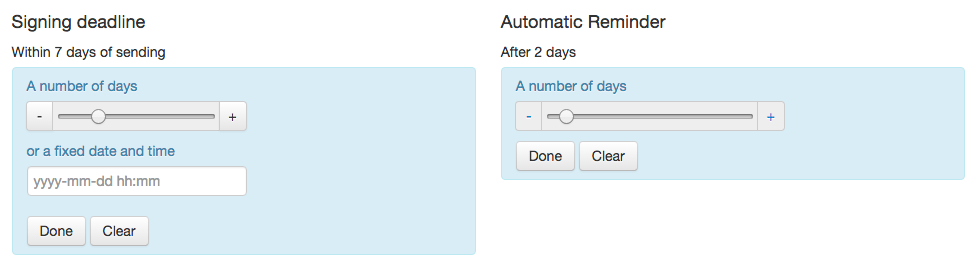
Yes! If you're sending a document for signing that mustn't be signed after a specific moment, you can specify the exact time and date that the case will expire. Enter the fixed date and time formatted as yyyy-mm-dd hh:mm in Central European Time (CET).
You can also set a time frame (a certain number of days).
These settings are made under Signing deadline in the settings for your case. The settings can also be made to a template.
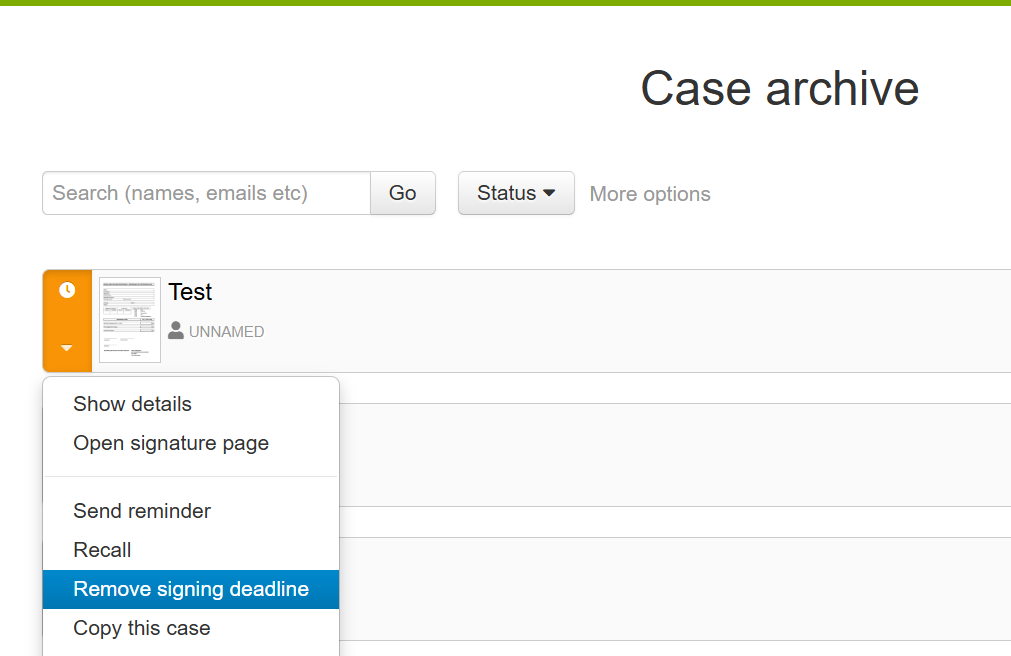
Note that the deadline is absolute, and that no party will be able to sign the case after the period has expired. You can remove the deadline from a sent case. Select "Remove signing deadline" from the cases's menu in the case archive.
Removing a deadline
If you've set a deadline for a case and want to remove it before it expires, follow these steps:
- Log in to your Assently account.
- Find the relevant case in the case archive.
- Click the arrow icon to the left of the case name to open the additional menu.
- From the dropdown menu, select "Remove signature deadline."
This action will remove the deadline, allowing all parties to sign the case at any time. Please note that you will now need to manually monitor the case to ensure it's completed and signed.