How do I send a batch case?
To send out a document that many parties are to sign individually, you can use the function Batch sending.
You find the function under Cases -> New case -> New batch send case.
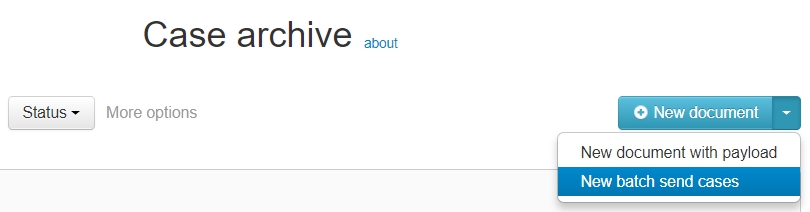
1. First upload the document/documents that are to be signed. These can either be static documents, or fillable forms.
2. Configure the settings for the batch case. These settings will be applied to each case created from the batch case.
3. Upload the source data containing the parties in CSV- or Excel-format with encoding set to UTF-8 without BOM, according to the instructions below.
NOTE! Batch sending is a powerful feature. We recommend that you test the entire flow before sending out a real batch case to multiple recipients. If you're in doubt, contact Assently!
NOTE! Batches over 25 entries might have to be split down into batches of 25 entries!
Sample source data (without form fields)
Each row in the source data flow the header represents a case.
| p1.name | p1.email |
| Anna | anna@example.com |
| Johan | johan@example.com |
You can set the following fields related to the parties
- pN.name
- pN.email
- pN.cellphone
- pN.groupname (Company name)
- pN.socialsecuritynumber (Personal identity number)
If you want multiple parties to sign each case, you can also add p2, p3, etc, depending on the number or parties that are to sign each case. For agreements its usually two (p1 and p2) or more parties that are signing, but for other types of documents it might only be one party signing. This can be different kinds of orders, confirmations, etc.
Sample source data with form fields
| p1.name | p1.email | Registration number | Account number |
| Anna | anna@example.com | 999999-0000 | 1234-5678901 |
| Johan | johan@example.com | 999999-0101 | 2345-5678910 |
If the document that's to be signed is in PDF and has fillable form fields, it's important that the naming of the row headers in the source data, have the same naming as the form fields.
Multiple documents with form fields
If you have several documents in your case you need to specify which form field is in which document (dN).
| p1.name | p1.email | d1.Registration | d1.Account | d1.Option | d2.Registration | d2.Date |
| Anna | anna@example.com | 999999-0000 | 1234-5678901 | Yes | 999999-0000 | 2019-01-01 |
| Johan | johan@example.com | 999999-0101 | 2345-5678910 | No | 999999-0000 | 2019-01-01 |
NOTE! Batch sending is a powerful feature. We recommend that you test the entire flow before sending out a real batch case to multiple recipients. If you're in doubt, contact Assently!