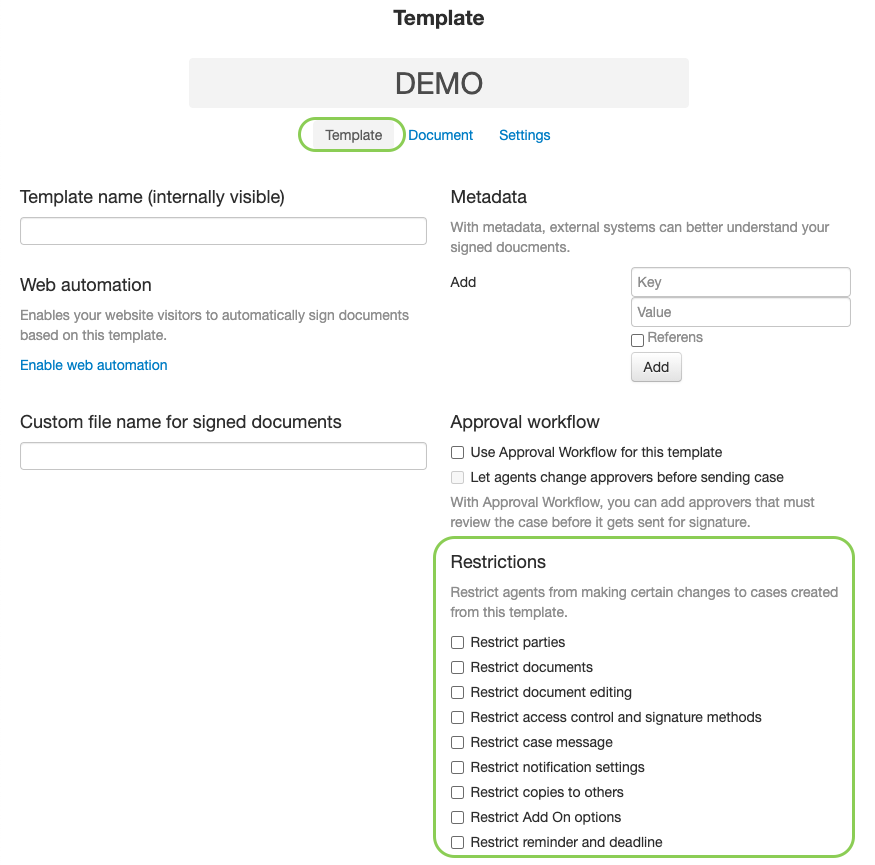
Resctrictions on a template
By working with templates, you can pre-configure your cases with the settings that are suitable for a certain agreement type you often work with. Those configurations could be to only allow signatures by e-identifications and not touch, that you require three signatures (no more no less), that you always want an additional notification to be sent somewhere external, etc.
You can either give or remove the permissions to edit templates to the agents on the Role settings, however, sometimes you only want to allow certain parts of the configuration and restrict others. This is when "Resctrictions" on templates is useful.
These are the resctrictions you can manage:
Restrict parties - Agents can not change the number of signing parties, nor make a party open/closed or set an individual language on the party.
Restrict documents - Agents can not remove the document added to the template nor add additional documents.
Restrict document editing - Agents can not can not edit a PDF with fillable fields.
Restrict access control and signature methods - Agents can not activate/deactivate Case Access Control nor change the allowed signature methods.
Restrict case message - Agents can not edit the texts in the notifications that are sent.
Restrict notification settings - Agents can not activate/deactivate the notifications that are sent.
Restrict copies to others - Agents can not add/remove that a notification is sent to an external stakeholder when a case has been signed.
Restrict Add On options - Agents can not edit any of the settings under the section "Add on options" (ex. set signing order, make a PDF fillable, add "Company Name" in signing party)
Restrict reminder and deadline - Agents can not activate/deactivate automatic reminders nor signing deadline.
Please note! The permission to shut off these restrictions are given on the agents role. Make sure that the agents that should not be allowed to shut of the restrictions lack this permission on their role.